Staff Attendance
Record who worked, who was away, and how many hours each person worked.
Turn on Staff Attendance
- In the store dashboard, open App Store and find Staff Attendance. Click Activate if the app is off and your plan includes it.
- Open Users → User Attendance. If you use more than one branch, check that you’re in the right branch first.
Under Roles & Permissions, give staff the Attendance → View permission to see records. Add Edit if they also need to mark or fix attendance.
Mark or fix attendance
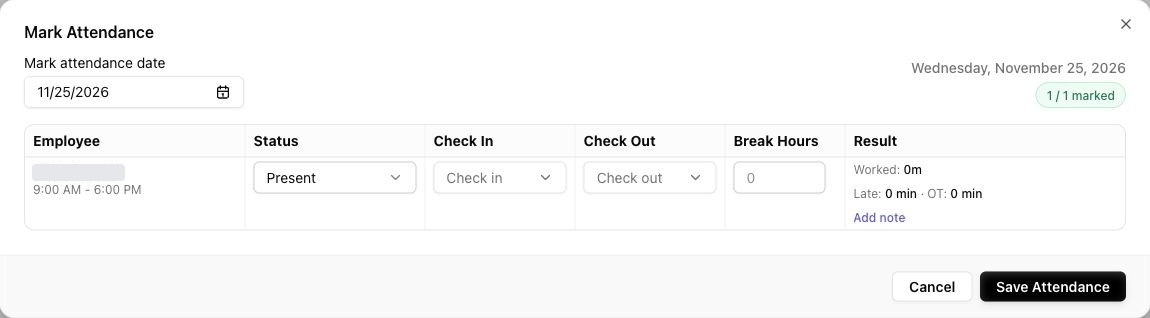
- Click Mark Attendance and choose the date you want to record.
- For each person, pick a Status, such as Present, Leave, Half Day, or Absent. Leave it as Pending if you still need to check.
- For Present or Half Day, enter Check In, Check Out, and any Break Hours. For example, enter 0.5 for a 30-minute break.
- Click Save Attendance. To fix a record later, open Mark Attendance again, choose the same date, and save your changes.
Review attendance and hours
- Use the date filter to choose the period you want to check.
- Use Table View to see totals for each person, including days present, days absent, and hours worked. Click a name to see that person’s records.
- Use Detailed View to see each person’s status for each day.
Set up and assign shifts
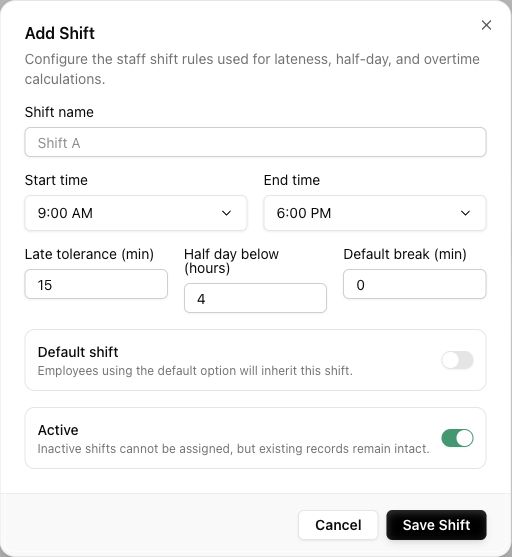
- Open Settings → Attendance and click Add Shift. Enter the shift name, start and end times, Late tolerance (min), Half day below (hours), and Default break (min). Click Save Shift, then click Save on the settings page.
- Turn on Default shift for the schedule most staff use. To give someone a different schedule, open Users → All Users, open the Attendance tab, choose a Shift, and save.
- When you mark a day, check the break and the Result. Worked time excludes breaks. Late time starts after the shift's late allowance. Worked time below the half-day minimum counts as a half day. Time after the scheduled end can count as overtime.